


Piano - music & songs games
4.79.04K Reviews
App Specs
- Version
- 3.58.00
- Updated On
- License
- Free
- Downloads
- 10,000,000+
- Developer
- MWM - AI Music and Creative Apps
- Categories
- Music & Audio
- Platform
- Android, iOS
Screenshots
 Analysis by AppCompare
I like to think of Piano - music & songs games as a small, low-pressure way to bring music into a spare moment. It sits in the music and audio category, but its appeal is also that of a casual game: you can open it for a quick session rather than commit to a formal practice routine. That makes it especially approachable if you are curious about piano but do not own one, or if you simply enjoy following melodies with your fingers.
What a quick session feels like
The key question for a mobile piano app is whether getting started feels immediate. Here, the simple layout and direct route into playing suit short visits: you can focus on the song instead of spending your first few minutes figuring out where to go. I would still treat “quick” as a reasonable expectation, not a promise that every device or session will feel identical. A touch-screen piano depends on your screen size and responsiveness, and those details shape the experience as much as the app itself.
That distinction matters if you are deciding between this and a conventional piano-learning tool. A structured course usually asks you to follow a longer sequence and build technique deliberately. This app is better approached as an inviting place to try songs and practice in small pieces. It can make music feel accessible, but tapping a screen is not the same physical skill as playing weighted keys, reading notation, or coordinating both hands on a real instrument.
How I would use it in an ordinary day
Picture a short break at home: you have a few minutes before dinner, open the app, choose a tune, and replay a tricky passage until the pattern starts to feel familiar. That is where the format makes sense. There is no need to set up an instrument or find a quiet practice room, and a brief session can still be satisfying. For a child exploring melodies with an adult nearby, or an adult who wants a light musical pastime, the low barrier to entry is part of the appeal.
A useful habit is to decide what you want from each visit before you start. If you are there to relax, pick something enjoyable and stop when it stops being fun. If you want to improve, repeat a small section and pay attention to timing rather than rushing through a whole song. This keeps the app from becoming just another tap-through distraction and gives each session a modest, achievable purpose.
Where it fits among piano apps
Compared with a piano keyboard simulator that mainly gives you open keys to explore, a song-led experience provides a clearer target: there is something recognizable to work toward. Compared with a full lesson platform, it is less suited to a serious curriculum or a step-by-step path toward independent piano playing. I see that as a trade-off, not a flaw. If you want musical play and accessible song practice, this format is appealing; if you want formal instruction, technique coaching, or a substitute for regular lessons, another kind of tool will serve you better.
The app is free to download, with in-app purchases ranging from $0.99 to $89.99 per item. I would approach any optional purchase by first checking whether the content or access it offers matches how often you actually play. A casual user may be perfectly happy trying the free experience before spending anything, while someone who returns often may decide that an upgrade is worthwhile. The important point is to judge value by your own routine rather than assuming that buying more automatically improves your playing.
Worth Reading Before You Choose

Baby Panda World Brings Quick Play to Modern Phones, but Its Game Library Feels Busy

ESPN’s Live Game View Makes Following Close Games Easier

QuizzLand Review: A Good Fit for Short Trivia Breaks, Not Every Player

Basketball Stars: Multiplayer Is Fast, but Can It Recover When Matches Go Wrong?

WEBTOON Turns Phone Updates Into a Better Reading Routine

Link to Windows Runs on Shared Habits, Not Social Feeds
Unlock Your Inner Pianist
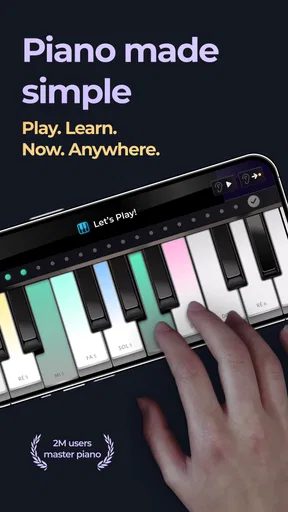
Right off the bat, Piano - music & songs games impresses with its intuitive interface. As soon as you open the app, you’re greeted with a sleek design that's easy on the eyes, making navigation a breeze. There's no steep learning curve here—just jump right in and start playing!
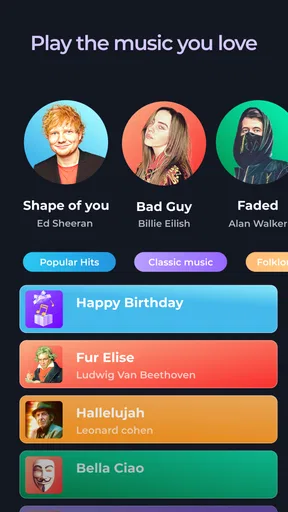
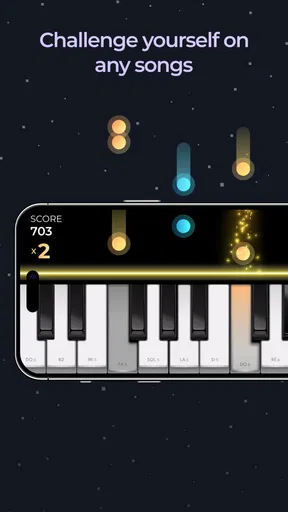
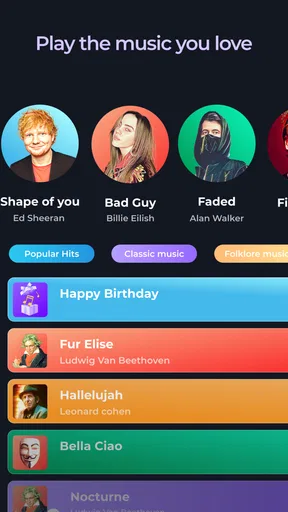
The app offers a wide variety of songs, from classical pieces to pop hits. Whatever your musical taste, you'll likely find something that tickles your fancy. Playing these songs is both fun and challenging, as the app gradually increases in difficulty, ensuring you stay engaged.
A Learning Experience
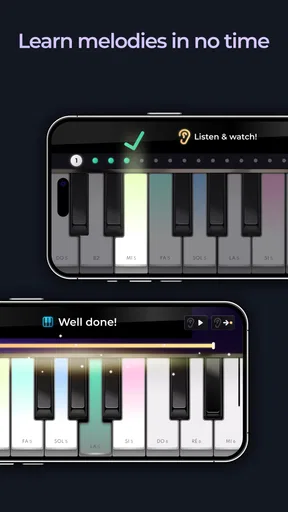
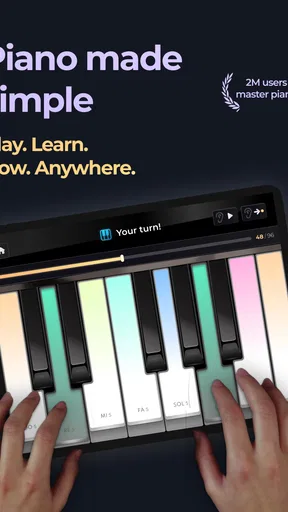
For those looking to learn or improve their piano skills, this app is a gem. It offers tutorials that guide you through each step of the song, making it easy for beginners to pick up the basics. The interactive lessons are a standout feature, allowing you to practice at your own pace. I found myself getting better with each session, which was incredibly satisfying.
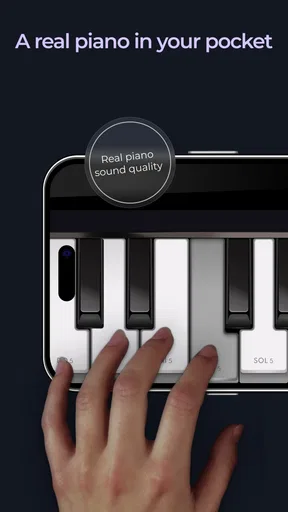
What sets this app apart are the realistic piano sounds. When you hit those virtual keys, it feels like you’re playing on an actual piano. This adds an extra layer of immersion, making your practice sessions feel authentic.
Features That Shine
One of the things I enjoyed most about this app is its multiplayer mode. You can challenge friends or other users around the world, adding a competitive edge to your practice. It's a great way to stay motivated, especially if you're the competitive type.
"Music is the universal language of mankind." - Henry Wadsworth Longfellow
Additionally, the app includes a song library that is regularly updated, ensuring you always have fresh content to explore. Whether you're in the mood for a soothing classical piece or a lively pop song, there's something new to keep your fingers busy.
Keeping play comfortable and consistent
Touch controls are convenient, but they also create a practical limit: your fingers cover part of the screen, and a narrow display can make fast passages awkward. I would start with slower, simpler pieces to learn where your hands naturally sit, then move to denser songs only when the layout feels comfortable. If you find yourself repeatedly hitting neighboring keys, changing how you hold the device or switching to a larger screen may help more than trying to tap faster.
For a more focused session, use headphones if you want to hear the notes clearly without turning up the phone speaker. That is a simple way to make practice less distracting in a shared room, though it will not change the feel of the controls. Likewise, short sessions are a sensible choice when you are using a phone: they keep the experience light and reduce the temptation to treat a small touch keyboard as a full-size instrument.
Stability, loading, and recovery
I would judge reliability by whether the app gets out of the way once you have chosen what to play. A music app is most pleasant when a session can begin without fuss, but performance can vary with device age, available resources, and what else is running. If a song feels delayed or the interface becomes sluggish, closing other demanding apps and reopening the piano app is a reasonable first troubleshooting step. I would not assume that every hiccup means the app itself is broken.
It is also worth separating a temporary interruption from lost musical progress. If you are working through a lesson or song, pause at a natural stopping point when possible rather than relying on an uninterrupted long session. That makes it easier to return with a clear idea of what you were practicing, even if a call or another everyday interruption pulls you away. The app’s casual format works best when you can resume without turning a short break into a complicated routine.
Who will enjoy it—and who may want something else
For someone who has never touched a piano, guided songs can make the first step less intimidating. The app also suits people who already play and want a playful way to revisit melodies, though experienced pianists may find a phone screen limiting for serious practice. Families can use the accessible format to explore music together, but an adult should set expectations: this is a digital activity, not a replacement for learning posture, hand position, or the sound and response of an acoustic instrument.
If your main goal is to learn music theory, read sheet music fluently, or build a disciplined practice plan, look for a tool or teacher organized around those goals. If you want to create your own arrangements or record music, a music-making app may be a better fit. This one is most convincing when the goal is simpler: enjoy songs, get a feel for piano patterns, and return when you have a few spare minutes.
Practical details before you install
MWM - AI Music and Creative Apps develops the app, which is free to install and rated for Everyone. It has a 4.7 average from around 242,000 ratings, and more than 10 million installs. Those figures suggest broad interest, but they do not tell you whether the playing style will suit your hands or whether you will prefer lessons on a physical keyboard. The current version is 3.54.01, and it runs on Android 7.0 or later.
One point worth deciding early is what “learning” means to you. If you want to recognize tunes and gain confidence tapping through a song, the guided format can be a pleasant start. If you expect it to teach transferable piano technique on its own, you may be disappointed. I would use it as a companion to a keyboard or lessons if those are part of your plan, rather than asking it to replace them.
Conclusion
In summary, Piano - music & songs games is more than just a game—it's an experience. Whether you're looking to learn, improve, or simply have fun, this app delivers on all fronts. With its user-friendly interface, realistic sounds, and engaging features, it’s a must-have for anyone passionate about music. So, why not give it a try and see what melodies you can create?
My performance verdict
I would recommend it as an easygoing music app, not as a demanding piano workstation. Its strongest quality is the low-friction invitation to play: the simple interface, song-based approach, and lessons make it approachable for curious beginners and casual players. Its main trade-offs are inherent to the format—touch-screen keys cannot provide the spacing or physical feedback of a real keyboard, and a phone is not ideal for long, intricate practice.
If you want a friendly way to spend a break with familiar melodies, this is a sensible option to try. If your priority is formal progress, precise performance practice, or composing, choose a tool built around that outcome instead. For me, the best reason to keep it installed is modest and worthwhile: it makes it easy to turn a few spare minutes into a little time with music.
Pros
- Engaging interface for all ages.
- Wide range of songs to choose from.
- Smooth gameplay with minimal lag.
- Customizable difficulty settings.
- Offline mode available for practice.
Cons
- Limited free song options.
- In-app ads can be distracting.
- Requires frequent updates.
- Some features locked behind paywall.
- Occasional bugs in song loading.
FAQs for Piano - music & songs games
What is the main objective of Piano - music & songs games?
Piano - music & songs games is designed to offer an engaging and fun way to learn piano. It combines interactive gameplay with music education, allowing users to play popular songs while improving their piano skills. The app is suitable for beginners and advanced players, providing various levels and challenges to enhance musical abilities.
Is the app suitable for beginners with no piano experience?
Yes, the app is perfect for beginners who have no prior experience with piano. It features a user-friendly interface and tutorials that guide users step-by-step. The various levels and gradual difficulty increments help newcomers slowly build their skills while enjoying familiar tunes.
Does the app offer a wide variety of songs to play?
Absolutely! Piano - music & songs games includes a diverse library of songs across multiple genres. Whether you enjoy classical, pop, rock, or jazz, the app provides a rich selection. Regular updates ensure that new songs are added, keeping the content fresh and exciting for users.
Are there any in-app purchases or subscription fees?
While Piano - music & songs games is free to download, there are optional in-app purchases and subscription plans available. These may include unlocking additional songs, removing ads, or accessing premium features. Users can enjoy a substantial amount of content without purchasing, but options exist for those seeking an enhanced experience.
How does the app enhance the learning experience?
The app enhances the learning experience through gamification, interactive tutorials, and real-time feedback. Users receive instant feedback on their performance, helping them correct mistakes and improve. The game-like progression keeps users motivated by rewarding achievements and unlocking new content as they advance.


